Configure Google
This guide will cover how to configure Google as an identity provider for OpenFaaS IAM. This is an easy way to authorize with OpenFaaS if your team is already using Google Workspace.
-
Setup a new project in the Google API console
-
Configure the OAuth consent screen.
Follow the steps to configure the OAuth consent screen under APIs & Services -> OAuth consent screen.
If you are a Google Workspace user you can make your app available to any user within your organization by registering it as an internal app.
-
Obtain OAuth 2.0 credentials
You will need to obtain a client ID and client secret for OpenFaaS. Create new OAuth Client ID credentials under APIs & Services -> Credential.
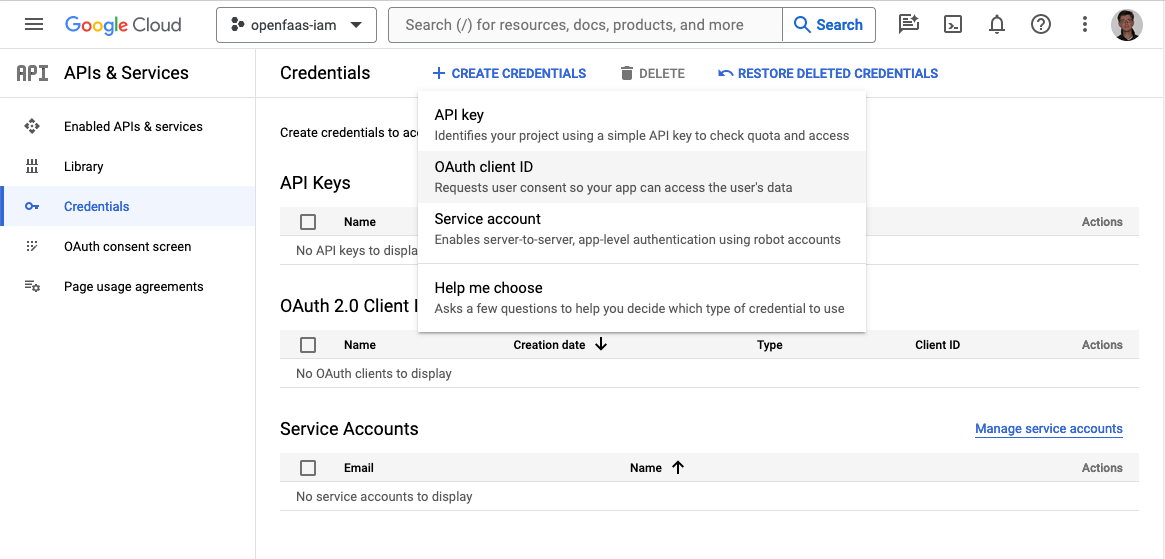
-
Add the callback URL for the CLI and dashboard to the list of valid redirect URIs.
Add
http://127.0.0.1:31111/oauth/callbackfor the CLI. If you are deploying the OpenFaaS dashboard, add the redirect URI for your dashboard e.ghttps://dashboard.openfaas.example.com/auth/callback.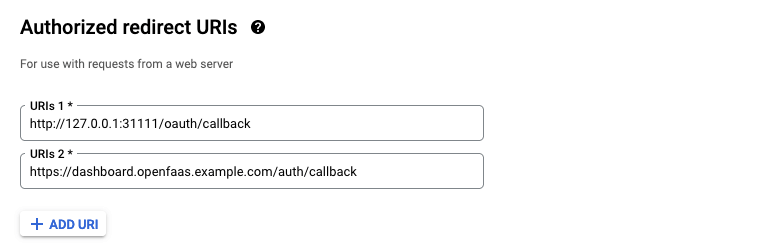
-
Register Google as a JwtIssuer with OpenFaaS
Create a JwtIssuer object in the
openfaasnamespace to register Google as a trusted issuer for OpenFaaS IAM.Example issues for Google:
apiVersion: iam.openfaas.com/v1
kind: JwtIssuer
metadata:
  name: accounts.google.com
  namespace: openfaas
spec:
  iss: https://accounts.google.com
  aud:
    - 156723843784956-dkebg39ro687we10ad39756kflrtpzsan.apps.googleusercontent.com
tokenExpiry: 12h
The
issfield needs to have the valuehttps://accounts.google.com.The
audfield contains a set of accepted audiences. For Google this is the client id that was generated in step 3. The client ID and secret can always be accessed from Credentials in APIs & Services in the Google API console.The
tokenExpiryfield can be used to set the expiry time of the OpenFaaS access token.
SSO with the faas-cli
Google does not support the Authorization Code flow with Proof Key of Code Exchange (PKCE). To login with the faas-cli use the Implicit Id flow.
faas-cli pro auth \
  --grant implicit-id \
  --authority https://accounts.google.com \
  --client-id CLIENT_ID